Version 16.11 - Now a Portable App
Version 16.11 was released today and is available for DOWNLOAD.
By popular demand, this version includes a new so-called portable app feature. A portable app is one that can be run without having to install and register components into the system. Rather, it is a self-contained folder for the executable and its bundled dependencies. Shotcut has always been portable in this sense regardless of the operating system. Portable apps can be put on a USB stick/drive and run from there. Then, you can use the app from computer-to-computer simply by plugging the USB stick. However, to be truly portable, the app should also use the USB stick to store settings and other app data.
Like most apps, Shotcut has an app data directory wherein it stores its
thumbnails/waveforms database, presets, and log file. Normally,
it stores settings in a platform-defined manner such as the registry on Windows
or a plist file in ~/Library on macOS. Now, you can set the app directory using
the command line option --appdata <directory> or the Settings > App Data Directory
menu. When you do, then settings are instead saved in an INI file in the designated
folder. If you use the menu, Shotcut will try to migrate everything from the
current location to the new location only if there is not existing Shotcut
data in the new location. Otherwise, it simply lets you start using the
new directory adopting the settings and data. If you use the command line option,
the new menu item is hidden making it possible to integrate the app into
an app launcher/updater more seamlessly.
Here are some other changes in this version:
- Fixed drag-n-drop to Timeline after moving clip to different track.
- Fixed LUT (3D) filter for languages/regions that use comma for decimal point.
- Fixed Properties > Speed on macOS for languages/regions that use comma for decimal point.
- Added Gaelic (Scottish) translation.
Return of the 32-bit Windows Build
Improved compatibility
Version 16.10 was released today and is available for DOWNLOAD.
The 32-bit Windows version is back by popular demand! 32-bit apps still have the significant limitation that they can only use 2 GB RAM, and Shotcut still uses a lot of RAM. We will see what we can do to reduce memory usage in the coming months. In the meantime, consider limiting yourself to working in 720 pixels of vertical resolution for multitrack projects, and try to avoid using very high resolution still images (scale them down before using them in Shotcut).
For Linux users, when we upgraded the build machine OS to Debian 8 in July for the 16.07 version, we lost a lot of compatibility with older versions of popular Linux distributions. Some people only lost the Stabilize filter. When this combined with the Qt upgrade in the previous release - v16.09 - many users, such as those on Mint 17 or Ubuntu 14.04, could no longer run the latest Shotcut. That is fixed in this release by using Ubuntu 14.04 as the base OS image for the build.
Lens Correction and 3D LUT Filters
A forum user has contributed a Lens Correction video filter. Thanks TwitchyMcJoe! Another forum user suggested to add a 3D LUT filter. Fortunately, this was already available through the MLT+FFmpeg engine, and it was easy to add a UI to expose this powerful filter.
Merge Clips on the Timeline
If you have adjacent sub-clips from the same source clip on the timeline, now you can right click to open the context menu and choose “Merge clip with next” to merge the clips into one.
Tiles and Icons Views for Playlist
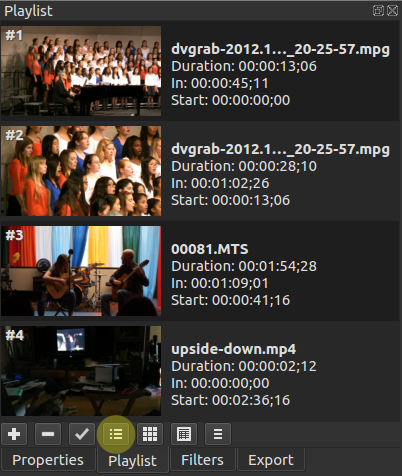
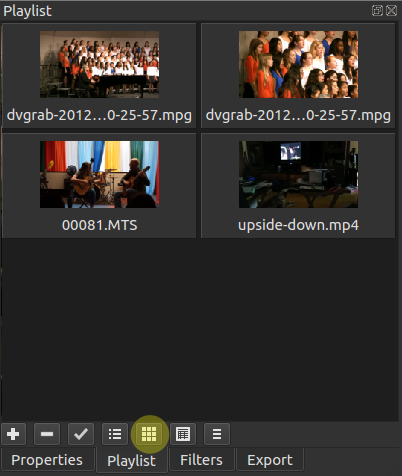
Thanks to Shotcut developer, Harald, new Tiles and Icons Playlist view modes were added to the new version 16.09, which is now available for DOWNLOAD. The old view mode is still available and named Details.
Video Tutorial: Film Restoration
In this tutorial Shotcut developer, Brian, shows how he uses some filters to clean up old, family 8mm films he had converted to digital.
The Discussion Forum Is Now Free
I decided to convert the discussion forum to be free-of-charge and supported through a moderate level of advertising. Some of you may know that I used to request a donation to gain membership. If you made a donation in the past 30 days, then advertising is turned off for you for next month. There might be an add-on package of services in the future that will include no ads in the forum. Thank you to everyone who contributed financially this year.
IMPORTANT: As a result of this change, if you already have an account on the forum you must reset your password.
Obviously, with the forum being free, the activity is going to increase, and I may not always be very active in there. Some employers have said something like “if only we could clone him….” ;-) Well, I am training my daughter who is in college to help me. Initially, she will be providing technical support and doing some web site maintenance. Eventually, I hope she can fix bugs and do development. This endeavor is turning into a nice father-daughter, dynamic-duo story!
Search
Recent Posts
- Posted on 01 Aug 2026
- Posted on 25 Jun 2026
- Posted on 29 Apr 2026
- Posted on 26 Feb 2026